In order to run Zerto cmdlets inside a script you have to add the snapin. This is easily done with the following command:
add-pssnapin Zerto.PS.Commands
My preferred method of doing this ensures that the script checks it is installed first. You should therefore put this at the start of any script calling Zerto or VMware cmdlets:
function LoadSnapin{
param($PSSnapinName)
if (!(Get-PSSnapin | where {$_.Name -eq $PSSnapinName})){
Add-pssnapin -name $PSSnapinName}}
LoadSnapin -PSSnapinName "VMware.VimAutomation.Core"
LoadSnapin -PSSnapinName "Zerto.PS.Commands"
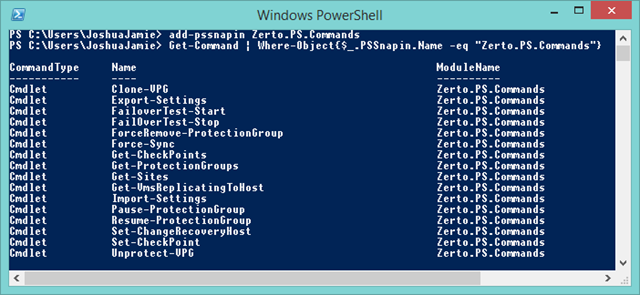
Once you have added the Zerto snapin you can list all of the cmdlets available by entering:
Get-Command | Where-Object{$_.PSSnapin.Name -eq "Zerto.PS.Commands"}
The cmdlets currently available are:
For a description on what each cmdlet does and the correct syntax use:
get-help clone-vpg
Happy scripting,
Joshua





 Virtually Sober
Leave a reply to Tom Cancel reply