To celebrate the upcoming ZertoCON 2018 (05/21 Boston) I thought it was about time that I updated some of my most popular Zerto scripts. Most were written before the API authentication change of ZVR 5.0 U3, and with the release of both ZVR 6.0 and PowerShell 6.0, this gives me an opportunity to update to all the 6s! To keep things simple each new version will be labeled v6 so you can easily tell which version you need.
Over the course of the next 2 weeks in the build-up to ZertoCON, I’m going to release an updated script every other weekday. If you haven’t signed up for ZertoCON yet click on the link below:

To future proof my work each new script is ONLY compatible with PowerShell 6+ and has only been tested on ZVR 6.0, running from both Windows 10 and Ubuntu. Yes, you read that right, you can run all of them just as easily in Linux as you can Windows! Just be sure to change the default logging directory variables at the start of each to your Linux filesystem and you’re good to go. If you need help installing PowerShell in Linux I used this guide:
Just to re-state this clearly; DO NOT RUN THESE SCRIPTS IN ANYTHING BEFORE POWERSHELL 6.0 AS THEY WON’T WORK! This is primarily due to the new way Invoke-RestMethod handles certificate exceptions.
I’m going to start with the latest version of my most popular script; the Zerto Recovery Plan. Need to orchestrate the recovery of multiple VPGs in a set order with boot delays between each? This is the script you need! Want to script starting and stopping a failover test? Check. Want to prompt the user with questions and run external scripts like SRM? Got that too.

To download the scripts, click below:
Unzip the script to C:\ZertoRecoveryPlanv6\ or your chosen Linux directory. Update the variables at the start of the script to match your ZVM IP/hostname and the directory you chose to extract to.
Note 08/24/18: I’ve added a PowerShell v5 version into the zip file due to much demand.
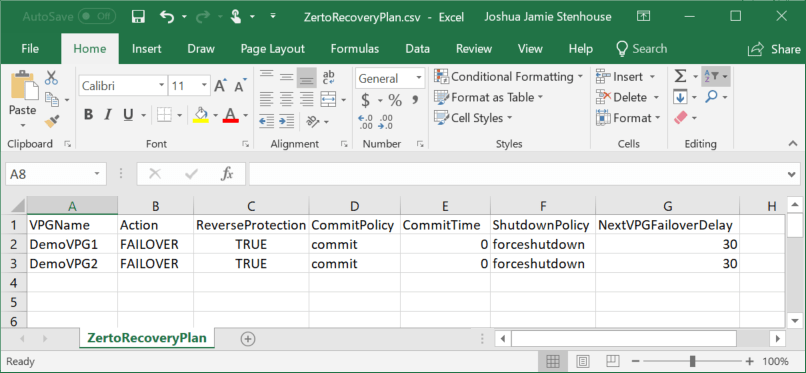
You’ll now see 2 versions; Simple and Advanced. Both examples come with a pre-built CSV and the values allowed are detailed in the requirements at the top of each Run script. Configure the CSV with your VPG names and desired settings and then run your chosen script. The stop script will only stop a failover test, if you have initiated a failover then you need to let it run its course or manually intervene (I.E no commit policy).
Simple gives you the ability to specify VPG failover order, Zerto recovery settings, and a boot delay between each VPG in seconds. I recommend most users starting with this before progressing to advanced.

Advanced does all the above, plus adds user prompts, 3rd party scripts, and extra boot delays for script operations. Because it adds complexity I decided to break this out for only the people who wanted this extra functionality.
Note: When running both scripts using VPGs configured with the TEST action in the CSV (as opposed to FAILOVER), you’ll see that all the settings on commit policy and reverse protection are ignored as they are of no use.
I hope you found this useful. If so, please like and share. Happy scripting,
Joshua






 Virtually Sober
Leave a reply to Joshua Stenhouse Cancel reply